


%20(1).webp)
ArchiGPT Toolkit for Architects
Prompt starters for your architectural design project

Change lighting
Adjust the lighting to create different moods, such as morning, sunset, or night.

Change perspective
Shift the camera angle to show the building from a new viewpoint.

Add elements
Introduce people, trees, or objects to make the scene feel more alive and dynamic.

Render with your texture
Add realistic textures and materials to enhance visual depth and detail.

Change style
Modify the architectural style to reflect different materials or design eras.

Close-up shot
Generate close-up shot to details of the building
ArchiGPT Toolkit for Interior design
Prompt starters for your interior design project

Close-up shot
Generate detailed close-up shots of your renders to highlight materials, lighting, and textures with precision.
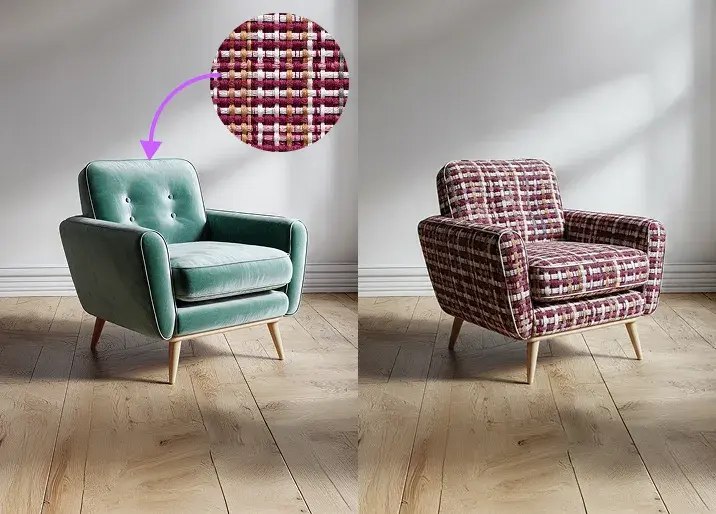
Apply texture
Apply custom fabrics or materials to your furniture and instantly visualize new textures in your renders.

Change elements
Easily change the colors of walls, furniture, or decor elements in your render to explore different design moods.

Place your furniture
Replace or reposition furniture in your render scenes effortlessly to test different interior layouts.

Renovate interior
Transform empty or old spaces into fully furnished rooms with realistic design renderings.

Get texture samples
Showcase the materials and textures used in your interior renders for presentations.
We have a plan for everyone who needs design assistant
Upgrade to Pro features and start working with your AI architecture design assistant
/
Basic
Perfect for personal and casual use cases.
$19
/month
billed monthly
100 images
Commercial use
Variation
Render history
Upscale
Pro
Most popular
Designed for creators ready to level up.
$39
/month
billed monthly
250 images
Commercial use
Variation
Render history
Upscale
Premium
Ideal for professionals and power users.
$79
/month
billed monthly
500 images
Commercial use
Variation
Render history
Upscale
Ultra
Built for teams, studios, and high-volume creators
$149
/month
billed monthly
1000 images
Commercial use
Variation
Render history
Upscale
Basic
Perfect for personal and casual use cases.
$10
/month
billed yearly $120
6 months free
100 images
Commercial use
Variation
Render history
Upscale
Pro
Most popular
Designed for creators ready to level up.
$20
/month
billed yearly $240
6 months free
250 images
Commercial use
Variation
Render history
Upscale
Premium
Ideal for professionals and power users.
$40
/month
billed yearly $480
6 months free
500 images
Commercial use
Variation
Render history
Upscale
Ultra
Built for teams, studios, and high-volume creators
$75
/month
billed yearly $900
6 months free
1000 images
Commercial use
Variation
Render history
Upscale
One time payment
One-time
$49
/month
billed one time - NO subscription
250 images
Commercial use
Variation
Render history
Upscale
Expires in 30 days
Is there a free trial?
Yes — ArchiGPT includes free trial renders before choosing any plan. Ongoing use starts at $19/month or with the $49 one-time package.
What happens when I use up my monthly renders?
You can upgrade to a higher plan at any time to get more renders, or purchase the one-time package as a top-up — your workflow never has to stop mid-project.
Can I use the renders commercially?
Yes — all plans include commercial usage rights, so renders can be used in client work, marketing materials and portfolios.
What's the difference between the monthly plans and the one-time package?
Monthly plans renew automatically and are ideal for ongoing projects, while the $49 one-time package gives you 250 images valid for 30 days — no subscription and no recurring charges.
Design smarter. Render faster. Collaborate with ArchiGPT.
ArchiGPT automatically selects the best engine based on your design intent
Visual Intelligence
Turn photos, sketches and 3D model screenshots into expressive, photorealistic renders.
Concept & Style Lab
Experiment with moods, styles, and materials through intelligent generation.
Spatial Design
Reimagine interiors and exteriors with AI-driven creativity.
Render Edit & Enhancement
Enhance lighting, textures, and details for true photorealism.
Cinematic touches
Bring your designs to life with cinematic addings like people, pet, car, etc.
Designs Created with ArchiGPT

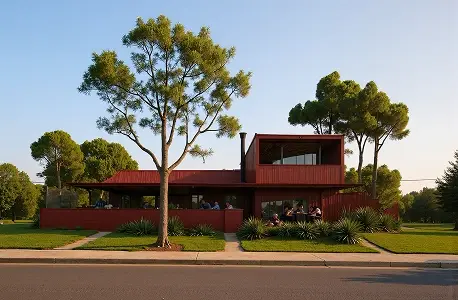
Generate renders
Create 3D design visuals


Change texture
Apply new material finish


Add elements
Include vegetation elements


Edit renders
Modify existing renders


Renovate building
Produce facade design


Change perspective
Adjust camera viewpoint


Generate close-up shot
Show design details

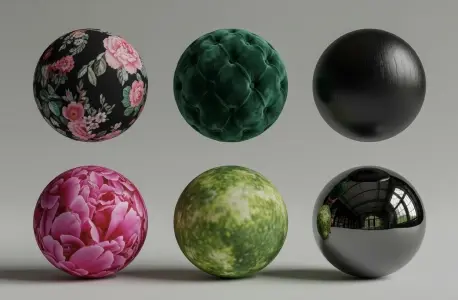
Make texture list
List used material types


Change lighting
Modify light conditions
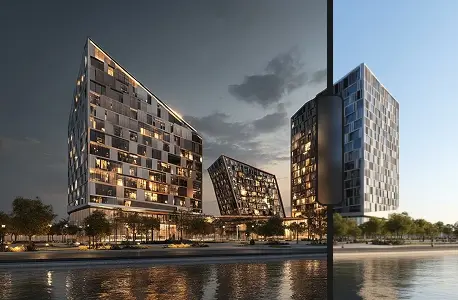

Change background
Replace scene environment


Image to moodboard
Convert image to moodboard

And many more...
Explore more design options
What Is ArchiGPT as an AI Design Assistant
ArchiGPT is an AI design assistant built on Architecture GPT, designed to understand architectural language, spatial intent, and design composition. It functions as a digital architecture assistant, turning sketches, images, and 3D model screenshots into photorealistic renders through natural language interaction.
Unlike conventional tools, ArchiGPT operates as an intelligent design assistant, interpreting context, materials, and light to produce meaningful visual results. Through prompt-based reasoning and AI rendering intelligence, it allows designers to explore concepts and generate presentation-quality images within seconds.
Benefits of Using an Architect GPT
Accelerated Rendering
Create photorealistic renders in seconds using AI rendering engines that replace manual post-production.
Multi-Engine Intelligence
ArchiGPT selects the ideal AI renderer automatically for interiors, exteriors, or landscapes.
Enhanced Visual Quality
Experience high-fidelity rendering with physically accurate lighting and textures.
Conversational Workflow
Use natural prompts to generate visuals with a prompt-to-render AI workflow.
Reduced Iteration Time
Generate instant results and adjust ideas faster with real-time rendering visualization.
Creative Exploration
Experiment with moods, materials, and styles through adaptive design intelligence.
Adaptive Creativity
The GPT-powered rendering tool learns from your design language, refining lighting, textures, and style accuracy.
Seamless Input Compatibility
Use sketches, photos, or 3D screenshots as input for quick visual transformation.
Context-Aware Rendering
ArchiGPT understands scene context adjusting perspective, and environment to ensure renders are integrated.
The Architect GPT AI Rendering vs Traditional Design Tools
Traditional rendering tools rely on manual setup, fixed parameters, and time-intensive workflows. In contrast, ArchiGPT AI Rendering introduces an adaptive, conversational process that transforms how visualizations are created. It replaces technical adjustments with intelligent automation, allowing architects to generate photorealistic renders in a fraction of the time while maintaining creative control.
Render time
Chat-based easy revisions
Post-production works
Using the tool without tutorials
Full performance without hardware purchase
ArchiGPT AI Rendering
Other
AI Render Tools
~15 seconds
1-5 hours
Frequently Asked Questions (FAQ)
What is Chat or Prompt Based Rendering?
Chat or prompt based rendering uses natural language as input to generate architectural visuals. Instead of manually adjusting render settings, users describe the design intent, and an AI rendering engine like ArchiGPT interprets the prompt to produce photorealistic renders instantly.
Do I need to download or install anything?
No — ArchiGPT runs entirely in the browser. There is nothing to download or install, and no GPU or special hardware is required.
Which inputs can I use to generate renders?
ArchiGPT generates renders from sketches, photos, 3D model screenshots, floor plans and text prompts.
What Makes ArchiGPT Different from Traditional AI Rendering Tools?
Unlike static AI render generators, ArchiGPT is a GPT-based architectural rendering system that understands spatial logic, design style, and context. It automatically selects the right rendering model and adapts to your creative direction, producing visuals that reflect true architectural photorealism.
Does ArchiGPT work on mobile?
Yes — ArchiGPT runs in the mobile browser; photos and sketches can be uploaded directly from a phone.
How Accurate Are the Renders Created by ArchiGPT?
Renders generated by ArchiGPT use deep learning rendering and ControlNet-based alignment for high structural accuracy. The results achieve high-fidelity rendering with realistic textures, perspective, and lighting, closely matching the intent of the original design concept.
Is the Output from ArchiGPT Editable After Rendering?
Yes. After generating renders, users can apply AI render enhancement tools to refine lighting, materials, and post-production details. The platform supports continuous iteration, allowing you to regenerate or adjust visuals through conversational commands.
How Secure Is Design Data Processed by AI Rendering Tools?
All data processed by ArchiGPT remains private to the user environment. The AI rendering engine operates through encrypted sessions, and uploaded sketches or models are used only for generating the requested AI-rendered visuals, ensuring data confidentiality.
Does ArchiGPT Require Prior Knowledge of Rendering Software?
No. ArchiGPT eliminates the steep learning curve of traditional visualization tools. Users interact through text prompts instead of technical render settings, making AI-driven design accessible even to non-specialists or early-career architects.